


Sprunki Ragdoll Playground
0.00.00 Reviews
App Specs
- Version
- 1.0
- Updated On
- License
- Free
- Downloads
- 10,000+
- Developer
- Doublentil
- Categories
- Simulation
- Platform
- Android
Screenshots
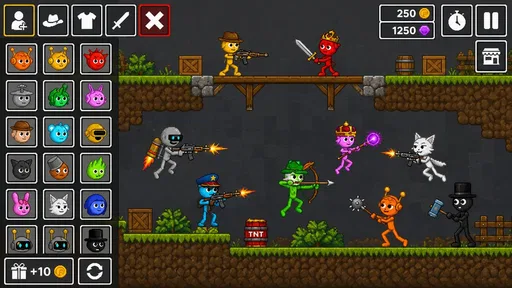
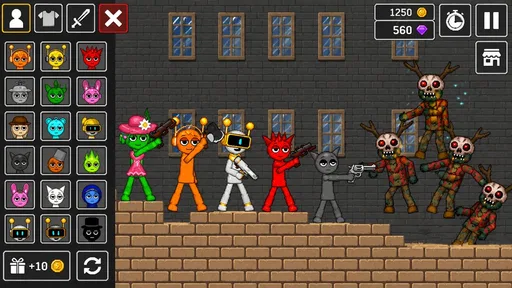
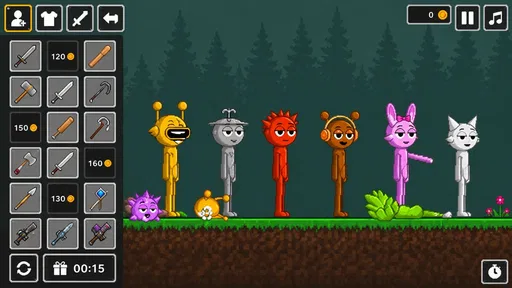
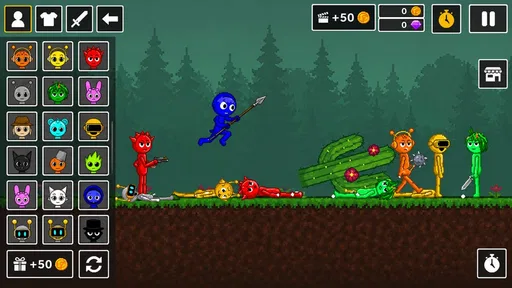
 Analysis by AppCompare
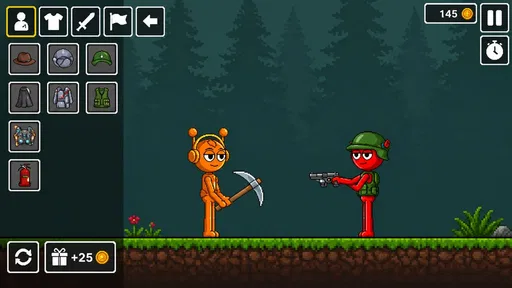
My first impression of Sprunki Ragdoll Playground was that it is less about winning and more about seeing what happens when I place, move, break, and rearrange things in a playful physics space. It belongs to the simulation side of mobile gaming, and that matters because there is no need to learn a long story or master a complicated rule set before having fun. I can open it, experiment for a few minutes, and stop when I have created something amusing.
The game is free, aimed at Everyone, and comes from Doublentil. It has reached over 10 thousand installs, which gives it the feel of a small, focused playground rather than a huge online platform. The current release is version 1.0, and it works on Android 7.0 or later. Those details make it easy to understand who should try it: someone looking for a light sandbox on a compatible phone, not someone expecting a deep campaign or a competitive multiplayer experience.
What to expect when you open the playground
The central appeal is experimentation. Instead of following a fixed sequence of missions, I treat the screen like a little test area. I can build a situation, watch the ragdoll action unfold, then take it apart and try a different arrangement. That simple loop is the reason the game can be relaxing one moment and surprisingly funny the next.
It helps to approach the title with the right expectations. This is not the kind of simulation where I manage a city, balance a budget, or follow a detailed career. Its pleasure comes from immediate interaction and unexpected results. A structure that looks stable can collapse after one small change, while a simple setup can become entertaining once several objects or characters begin reacting to one another.
The best way to play is to treat each attempt as a small experiment, not a test you can fail. That attitude removes much of the pressure that often makes mobile games tiring. If a setup goes wrong, the mistake is usually useful: it shows which part of the arrangement is too heavy, too unstable, or simply not as interesting as it looked in my head.
For a first-time player, the main adjustment is accepting that the game may not constantly tell you what to do. The freedom is the point, but freedom can feel slightly empty if you expect a checklist. I found it more satisfying to give myself small challenges, such as making a balanced scene, creating a controlled collapse, or finding the funniest result from a very simple arrangement.
The name suggests a playful character-focused sandbox, and that is the mood I get from it. The ragdoll behavior gives ordinary movements a comic quality, especially when a carefully planned setup produces an awkward tumble. I would not choose it for a serious physics lesson, but I would choose it when I want a quick creative distraction that rewards curiosity.
Worth Reading Before You Choose

EA SPORTS FC Mobile 26 Is a Bigger Football Game, but It Takes Time

Flipboard Shows What News Apps Must Do Beyond the Feed

Switching to Android Auto Means Rethinking Your Driving Routine

Google Calendar Makes a Crowded Week Easier to Manage

Ludo King Makes the Most of the Minutes Between Plans

Baby Panda World Brings Quick Play to Modern Phones, but Its Game Library Feels Busy
Who will enjoy it most
This is a good fit for players who like toy-box games, physics experiments, and open-ended interaction. It also suits people who prefer short sessions because I do not need to prepare for a long campaign before seeing something happen. A child or casual player can explore the basic idea quickly, while an older player may enjoy inventing more elaborate scenes.
It is less suitable for anyone who needs clear objectives, character progression, or a strong sense of completion. If your favorite simulations are built around unlocking systems, improving statistics, or managing a growing world, this playground may feel too loose. A conventional puzzle game would be a better choice when you want one correct answer, and a structured construction game would be better when you want long-term building goals.
Starting smoothly on a first phone
Because the game supports Android 7.0 and newer, the first practical step is checking that the phone meets that basic requirement. Once installed, I recommend starting with a short session rather than trying to understand every possible interaction immediately. The fastest route to enjoyment is simply placing something, moving it, and observing the result.
On a smaller screen, I found it useful to keep my first scene uncluttered. When too many elements are introduced at once, it becomes harder to understand which action caused a reaction. A clean starting area makes the physics easier to read and gives me a better sense of how the controls respond. After that, I can add complexity without confusing cause and effect.
My practical setup routine is simple. I begin near an open part of the playground, make one change, pause to watch what it does, and only then add another piece. This is more effective than tapping rapidly and hoping a funny result appears. It also helps a new user identify whether the game feels comfortable on their particular device before investing time in a larger scene.
One useful habit is to build from the bottom upward. A stable base gives the rest of the scene a purpose, while placing everything at once tends to create random movement that is difficult to reproduce. If the first arrangement collapses immediately, I do not regard that as a failure; I use it as a quick demonstration of how sensitive the playground can be.
The game is free, so the barrier to trying it is low. I still suggest installing it with a clear idea of what you want from it. The absence of a purchase requirement does not turn an open sandbox into a mission-based game. Its value is in the freedom to play with situations, not in collecting a large amount of conventional progress.
Your first meaningful success
For me, the first satisfying success was not building the biggest scene. It was creating a small arrangement that behaved roughly as intended: a stable starting point, a deliberate disturbance, and a visible chain of movement afterward. That sequence gave the game a purpose and showed why the ragdoll style can be more entertaining than simply dropping objects at random.
To reproduce that kind of moment, begin with one simple base and one movable element. Place them with enough space that you can see the relationship between them. Then make a single change and watch closely. If the result is too chaotic, simplify the setup rather than adding more pieces. If nothing interesting happens, change the position or angle of one element instead of rebuilding everything.
This method reveals an important strength: the game rewards observation. I start noticing small differences between a balanced arrangement and an unstable one. A tiny adjustment can change the timing or direction of a fall, which gives repeated attempts a purpose. I am not grinding for points; I am learning how to produce a result I can recognize and repeat.
A second useful challenge is designing a scene that looks good before anything moves. This prevents the experience from becoming pure button pressing. I can arrange a compact little setup, leave clear space around it, and then trigger the action. The contrast between the calm starting picture and the untidy aftermath is often where the humor comes from.
For a child using the game, I would suggest an adult demonstrate one short experiment first: make a simple structure, change one part, and explain why watching the result is the goal. That gives the player a concrete starting point without turning the session into a lesson. For a casual adult player, the same approach works as a five-minute break between other tasks.
Small techniques that make experiments better
The first technique is controlled repetition. When something amusing happens, I try to recreate it with fewer elements. If the same effect still appears, I have found a meaningful interaction rather than a one-time accident. This makes the sandbox feel more intentional and helps me understand which parts of a scene actually matter.
The second is separating construction from testing. I build the arrangement first, then stop changing it long enough to observe the result. Mixing both actions at once makes it difficult to tell whether a result came from the original setup or from a late adjustment. This two-stage workflow is especially helpful during the first few sessions.
The third is using failure as a design tool. A collapse can show me that the base is too narrow, the placement is uneven, or the scene contains more movement than I can follow. Instead of immediately starting over, I change just one factor. That turns a random-looking playground into a basic trial-and-error system that feels surprisingly rewarding.
I also prefer leaving visual breathing room. Crowded scenes may look ambitious, but they hide the important movement. A smaller setup lets me see the ragdoll response clearly and makes it easier to identify the moment when the scene changes. Once I understand the behavior, I can increase the number of elements for a more chaotic result.
These habits are not official missions, and that is precisely why they help. They give structure to a game that intentionally leaves the player in control. Someone who opens the app and feels unsure what to do can use them as personal objectives without expecting the game to provide a traditional progression path.
Common confusion and honest limitations
The biggest possible confusion is mistaking an open sandbox for a standard game with a clear ending. I initially looked for the sort of instruction that would tell me what counted as success, but the better question is what kind of scene I want to create. Once I stopped waiting for a conventional objective, the loose format became much more comfortable.
Another source of confusion is unpredictable movement. Ragdoll behavior is entertaining partly because it does not always look perfectly controlled. If I expect every object to react with exact precision, some results may feel messy. The trade-off is that the same unpredictability creates the surprising moments that make the game worth revisiting.
There is also a practical limit to open-ended play: novelty depends on the player. Two people can use the same playground and have very different experiences because one invents scenarios while the other waits for a built-in challenge. If you know you lose interest without goals, you may reach that limit quickly. A level-based physics game would offer more direction.
I would not recommend it as a replacement for a full construction simulator. Those alternatives usually provide stronger planning tools, clearer progression, and more reasons to return to a project over a long period. This game is better understood as a quick experimental toy. It wins on immediacy and playful accidents, while more structured alternatives win on depth and sustained objectives.
Compared with a puzzle game, the difference is even clearer. A puzzle asks me to solve a designed problem; this playground asks me to create a situation and interpret what happens. That makes it more flexible but less precise. There are moments when I want the satisfaction of a correct solution, and those are moments when I would choose another category instead.
The current release is version 1.0, so I approach it as a focused starting point rather than a mature, feature-heavy platform. That does not make it a poor download, but it does reinforce the need for realistic expectations. I enjoy it most in short bursts, especially when I want to experiment without committing to a long session or a complicated ruleset.
Everyday situations where it works
Imagine having a few minutes while waiting for an appointment. A story-driven game may be awkward because it is hard to stop at a meaningful point, while a competitive game may demand more attention than you want to give. Here, I can create one small scene, observe the result, and close the app. The session has a beginning and an end without requiring a major commitment.
It can also work as a shared activity. One person can design the starting arrangement while another predicts what will happen. Then the scene becomes a small guessing game: will it remain stable, tip to one side, or send the ragdoll into an unexpected tumble? That social use gives the sandbox more purpose than solitary tapping, even though the game itself is not presented as a formal party title.
For creative-minded players, the app can serve as a rough visual sketchpad for motion. I can test whether a scene feels calm, chaotic, funny, or dramatic before deciding what to build next. It is not a professional animation tool, but the immediate physical response makes it useful for quick ideas and playful storytelling.
Parents should also consider the Everyone rating in context. The accessible age classification makes the game approachable, but a younger player may still benefit from a short explanation of the open-ended format. The most helpful guidance is not about winning; it is about changing one thing at a time and enjoying the result.
Who should download it and what to try next
I recommend Sprunki Ragdoll Playground to anyone who wants a free, low-pressure simulation built around playful physics and personal experiments. It is especially appealing if you enjoy discovering outcomes rather than following instructions. The developer, Doublentil, has kept the core idea easy to grasp: create a setup, disturb it, and see how the ragdoll world responds.
I would skip it if your priority is a campaign, detailed management, online competition, or a dependable stream of unlockable rewards. Those needs call for a more structured alternative. I would also skip it if random-looking movement frustrates you, because the imperfect, surprising reactions are central to the experience rather than an occasional side effect.
For a first session, my recommendation is to aim for one repeatable experiment. Build a small stable scene, alter a single part, observe the movement, and then adjust only that part on the next attempt. This creates a clear path from installation to a meaningful result and avoids the common mistake of filling the screen before understanding the basics.
After that, choose one of three directions: make the scene more stable, make the collapse more dramatic, or make the starting picture more visually interesting. Each direction changes how you play. Stability encourages careful placement, drama encourages controlled chaos, and appearance encourages you to think about the scene before activating it.
My final view is positive but measured. This is not a deep simulation pretending to be a complete world; it is a compact playground that becomes enjoyable when I bring my own ideas. Its free access, Everyone rating, and modest technical requirement make trying it straightforward, while its open-ended design means the quality of each session depends on how willing I am to experiment.
If that sounds like your kind of mobile game, it is worth giving the sandbox a fair first session instead of judging it after a few random taps. Start small, watch carefully, and let the unexpected movement guide the next attempt. That is where I found the real charm: not in reaching a final objective, but in turning a simple setup into a result I wanted to see again.
Pros
- Creative sandbox with plenty of ragdoll experimentation
- Simple controls make it easy to start playing quickly
- Physics interactions create entertaining and unpredictable moments
- Many objects encourage experimentation and playful combinations
- Works well for short
- casual gaming sessions
Cons
- Gameplay can become repetitive after extended play
- Some features may require in-app purchases or unlocks
- Physics behavior is occasionally inconsistent
- Ads may interrupt the experience for free users
- Limited challenge may not appeal to competitive players
FAQs for Sprunki Ragdoll Playground
What is Sprunki Ragdoll Playground?
Sprunki Ragdoll Playground is a physics-based sandbox game centered on ragdoll characters, playful experiments, and interactive environments. After exploring the available tools and objects, players can create chaotic scenes, trigger reactions, and test how characters respond to different obstacles. It is designed more for casual experimentation and entertainment than for completing a traditional story or following a fixed level-based campaign.
How do you play Sprunki Ragdoll Playground?
Gameplay is generally based on selecting characters, objects, and environmental elements, then placing or interacting with them on the playground. You can move items around, experiment with physics, and observe the resulting animations. The controls are usually straightforward and suitable for short play sessions, although understanding how different objects behave may take some trial and error. Much of the enjoyment comes from discovering unexpected combinations.
Is Sprunki Ragdoll Playground suitable for children?
The game has a cartoon-style presentation and focuses on ragdoll physics, but parents should still review the content before allowing younger children to play. Some interactions may involve crashes, falls, or exaggerated slapstick violence, even when presented humorously. Age suitability can also vary depending on the version, advertisements, and platform rating, so checking the official store listing and available parental controls is recommended.
Does Sprunki Ragdoll Playground require an internet connection?
Basic playground activities may be available offline, which makes the game convenient for quick entertainment while traveling or when a stable connection is unavailable. However, certain features can depend on internet access, including advertisements, updates, online services, or optional downloadable content. Availability may differ between Android and iOS versions, so it is best to test the installed version and review its permissions before relying on offline play.
Is Sprunki Ragdoll Playground free to download?
Sprunki Ragdoll Playground may be offered as a free download, but the exact business model depends on the version available through the official Android or iOS store. Free versions can include advertising, optional purchases, or limitations on characters and tools. Before installing, check the store page for in-app purchase information, supported devices, privacy details, and recent user reviews to confirm what is included.


